Integrating with Microsoft Agent Framework
AuDesign Voice is the voice surface. Agent Framework is the agent runtime. Pair them and you get a UAE-resident voice agent that can plan, call tools, and use Foundry's hosted capabilities — driven from a browser or any client that speaks the AuDesign Voice WebSocket protocol.
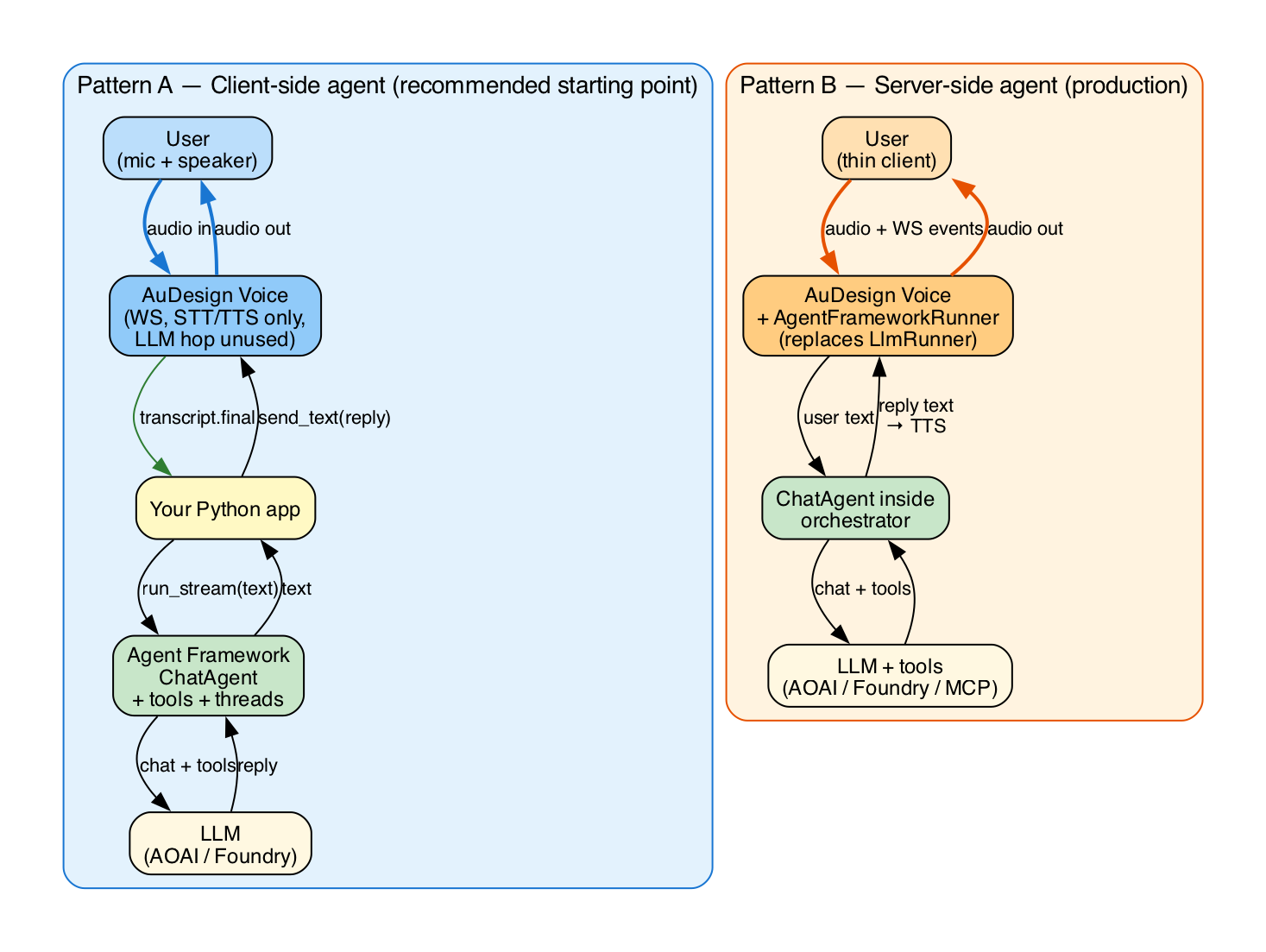
There are two integration patterns. Pick based on where you want orchestration to live.
Pattern A — Client-side agent (recommended starting point)
Agent Framework runs in the same process as the AuDesign client. Voice in/out goes through AuDesign; reasoning, tools, and memory live in your Agent Framework ChatAgent.
[browser/mic] ──audio──▶ AuDesign WS ──text──▶ your Python process ──▶ ChatAgent
                                ◀───audio──── (TTS of agent reply)
The orchestrator's LLM hop is bypassed: the AuDesign client subscribes to transcript.final events, hands the text to the agent, and uses client.send_text(...) to inject the agent's reply for synthesis.
# pip install agent-framework audvoice-client
import asyncio
from agent_framework import ChatAgent
from agent_framework.azure import AzureOpenAIChatClient
from azure.identity.aio import AzureCliCredential
from audvoice_client import AudVoiceClient

async def main():
    chat_client = AzureOpenAIChatClient(
        endpoint="https://your-aoai.cognitiveservices.azure.com/",
        deployment_name="gpt-4.1",
        credential=AzureCliCredential(),
    )

    def get_weather(city: str) -> str:
        """Return a fake weather string for the given city."""
        return f"It's 32 °C and sunny in {city}."

    agent = ChatAgent(
        chat_client=chat_client,
        instructions="You are a friendly Arabic/English voice assistant. Keep replies short.",
        tools=[get_weather],
    )

    async with AudVoiceClient("https://voice.example.com", api_key="…") as voice:
        await voice.update_session(
            voice="ar-AE-FatimaNeural",
            languages=["ar-AE", "en-US"],
        )

        thread = agent.get_new_thread()

        async for ev in voice.events():
            if ev["type"] == "transcript.final":
                user_text = ev["text"]
                # Run the Agent Framework agent and stream the reply back to TTS
                reply = ""
                async for chunk in agent.run_stream(user_text, thread=thread):
                    if chunk.text:
                        reply += chunk.text
                if reply:
                    await voice.send_text(reply)

asyncio.run(main())
Pros: Full Agent Framework feature set (tools, MCP, hosted Foundry tools, threads, middleware). LLM call is one round-trip — no double-hop through the orchestrator.
Cons: Each client needs to embed the agent. The orchestrator's LLM is wasted (configure a cheap model or set LLM_BACKEND=openai pointed at a stub if cost matters).
💡 To avoid the orchestrator running the LLM at all, send the user message via
voice.send_text(...)— the server will still hit the backend LLM. The cleanest version of this pattern uses a tiny local "echo" backend; see LLM backends. A future protocol flag (session.update.disable_llm: true) is on the roadmap.
Pattern B — Server-side agent (production)
Agent Framework runs inside the orchestrator, replacing the default Azure OpenAI chat call. Clients stay thin — they only speak the AuDesign WebSocket protocol.
This requires a small adapter inside apps/orchestrator/audvoice/llm.py:
# audvoice/llm_adapter_agent_framework.py  (new file you'd add)
from agent_framework import ChatAgent
from agent_framework.azure import AzureOpenAIChatClient
from azure.identity.aio import DefaultAzureCredential

from .llm import LlmDelta

class AgentFrameworkRunner:
    def __init__(self, instructions: str, tools: list):
        client = AzureOpenAIChatClient(
            endpoint=settings.azure_openai_endpoint,
            deployment_name=settings.azure_openai_deployment,
            credential=DefaultAzureCredential(),
        )
        self.agent = ChatAgent(chat_client=client, instructions=instructions, tools=tools)
        self.thread = self.agent.get_new_thread()
        self._pending_user: str | None = None

    def add_user_text(self, text: str): self._pending_user = text
    def truncate_assistant_at(self, n: int): pass  # no-op for v1

    async def stream(self):
        if not self._pending_user: return
        async for chunk in self.agent.run_stream(self._pending_user, thread=self.thread):
            if chunk.text:
                yield LlmDelta(kind="text", text=chunk.text)
        self._pending_user = None
        yield LlmDelta(kind="done")
Wire it in audvoice/session.py by replacing LlmRunner() with AgentFrameworkRunner(...). (We deliberately did not bake this into v1 to keep agent-framework an optional dependency; add it to apps/orchestrator/pyproject.toml as [project.optional-dependencies] agent-framework = ["agent-framework>=…"] when you adopt this pattern.)
Pros: Clients are tiny. One place to configure agents, tools, observability. Cons: All sessions share the agent's tool set unless you fan out per-session.
Wrapping a Foundry agent as a tool
If your team already publishes hosted agents in a Foundry project, you can use them as a single tool from the AuDesign side:
from agent_framework.azure import AzureAIAgentClient
foundry_agent = AzureAIAgentClient(
    project_endpoint="https://your-project.services.ai.azure.com",
    agent_id="asst_…",                # an existing Foundry agent
    credential=AzureCliCredential(),
).as_agent()

# Use it as a sub-tool of an outer voice-facing agent
voice_brain = ChatAgent(
    chat_client=chat_client,
    instructions="Use the specialist tool when the user asks domain questions.",
    tools=[foundry_agent.as_tool(
        name="domain_expert",
        description="Answers in-depth questions about <your domain>",
        arg_name="question",
    )],
)
The voice-facing agent stays generalist and chatty; the Foundry agent does the heavy lifting (web search, code interpreter, file search, hosted MCP).
What about audio handoff?
Agent Framework, today, doesn't itself stream raw audio — it works in text/messages. AuDesign Voice handles the audio plane (PCM in, PCM out, barge-in, VAD). The boundary is text: AuDesign emits transcript.final events, and you push agent replies back via send_text(...) for TTS. This separation is intentional and matches Voice Live's own architecture.
Roadmap
session.update.disable_llm: trueflag so Pattern A doesn't pay for an unused LLM call.- Built-in
AgentFrameworkRunnerin the orchestrator under an extras install. - Per-session tool fan-out so server-side agents can vary per tenant.